Online Search and Internal Search
Sanner.AI includes specialized modes that help you work with both your own knowledge and the wider web.
Written By Saner.AI
Last updated 10 months ago
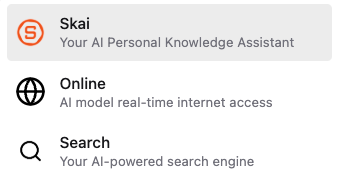
Online Assistant Mode
Use this mode when you need information that isn’t already in your Saner.AI workspace.
Online Assistant Mode gives Saner.Ai access to real-time information from the web. This allows it to support your thinking with current, external sources when your personal notes or files aren’t enough.
With Online Assistant Mode, it can:
Search the web in real time for up-to-date information
Answer questions about current events, new tools, or niche topics
Provide responses supported by real-world data, including references when available
Add external context that complements your existing notes and knowledge
This mode is useful when your question goes beyond what you’ve already captured in Saner.AI
To access this mode, go into “Ask AI” screen, then on the chat bar, click the model selector icon, then choose “Online”
Search Mode
Use this mode when you want to find or understand something inside your own workspace.
Search Mode activates Saner.AI’s AI-powered internal search, designed for deep and personalized knowledge retrieval across your content.
With Search Mode, you can:
Instantly find information from your notes, tasks, files, and saved knowledge
Get concise summaries from long documents or multiple related notes
Search by meaning, not just keywords, even if you don’t remember exact wording
Search Mode is ideal for:
Rediscovering ideas you wrote down weeks or months ago
Revisiting related thoughts across multiple notes
Turning scattered information into a single, clear insight
To access this mode, go into “Ask AI” screen, then on the chat bar, click the model selector icon, then choose “Search”
How to Choose the Right Mode
Use Online Assistant Mode when the answer requires fresh or external information
Use Search Mode when the answer already exists somewhere in your Saner.AI workspace
Was this helpful?
Still need help? Share an idea