The Knowledge System Overview
This provides an overview of the Knowledge System, the central space for managing folders, notes, tags, and shared content.
Written By Saner.AI
Last updated 9 months ago
The Knowledge System is where everything you save in Saner.ai lives and stays organized.
It brings folders, notes, tags, and shared content into one structured workspace, so you can:
Find information quickly
See how ideas are connected
Act on your knowledge without digging or context switching
The system is designed to scale with you. As your notes and projects grow, your workspace stays clear, navigable, and easy to manage - without turning into a messy archive.
What the Knowledge System helps you do
Keep all your knowledge in one place
Organize information in a way that feels natural
Move between notes, ideas, and resources with minimal friction
Collaborate with others without losing structure
How the Knowledge System is structured
The Knowledge System is located on the left sidebar. It is made up of three core sections: Folders, Tags, and Shared with me.
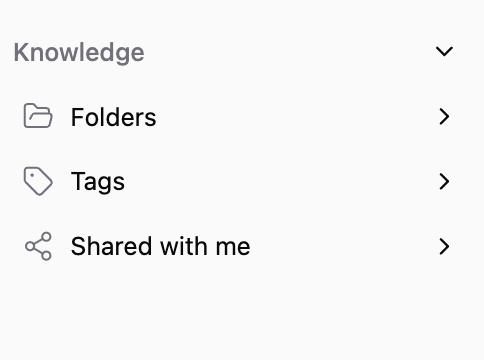
1. Folders
Folders help you organize notes and documents using a familiar, hierarchical structure - similar to folders on your computer.
Use folders to:
Group-related notes and documents
Create clear project or topic areas
Keep your workspace structured at a high level
Folders work best when you want clear ownership and boundaries between sets of information.
How to think about folders
You don’t need to stress about perfect folder organization.
Folders are meant to give you a quick, high-level view of your notes - not to be a rigid system you have to maintain.
If you need to find something:
Skai can search across all your notes, folders, and synced content
You don’t need to remember where something is stored
Think of folders as:
A fast way to browse
A lightweight structure for visibility
Not a requirement for finding information
The Connector folder
There’s a Connector folder that lives inside the Knowledge section. It stores content synced through the Connector feature.
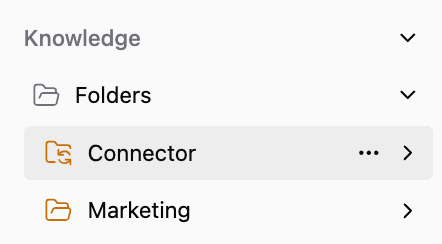
The content stored in the Connector folder includes:
Emails
Calendar events
Google Docs
Slack
…
Anything brought in through a connector is automatically saved here
2. Tags
Tags let you categorize and connect notes across different folders.
Use tags to:
Link related ideas that live in different folders
Add flexible labels like topics, themes, or statuses
Find related notes quickly
Tags are designed for cross-cutting connections, where one note belongs to multiple contexts.
3. Shared With Me
Shared With Me shows all notes and folders that other Saner.ai users have shared with you.
This section helps you:
Access shared knowledge in one place
Collaborate without losing track of content
Keep shared notes separate from your personal workspace
Everything shared with you stays organized and easy to revisit.
Was this helpful?
Still need help? Share an idea