Saner.AI Homepage
Written By Saner.AI
Last updated 9 months ago
The Saner.AI Homepage is your main dashboard. It’s designed to help you quickly understand your day, stay focused, and act on what matters most - without needing to search across emails, tasks, notes, or calendars.
When you open Saner.AI, you’ll land on the Home screen, which is organized into two core areas that support daily productivity.
Main Sections on the Home Screen
1. AI Proactive Message
This section gives you a daily overview generated by Saner’s AI.
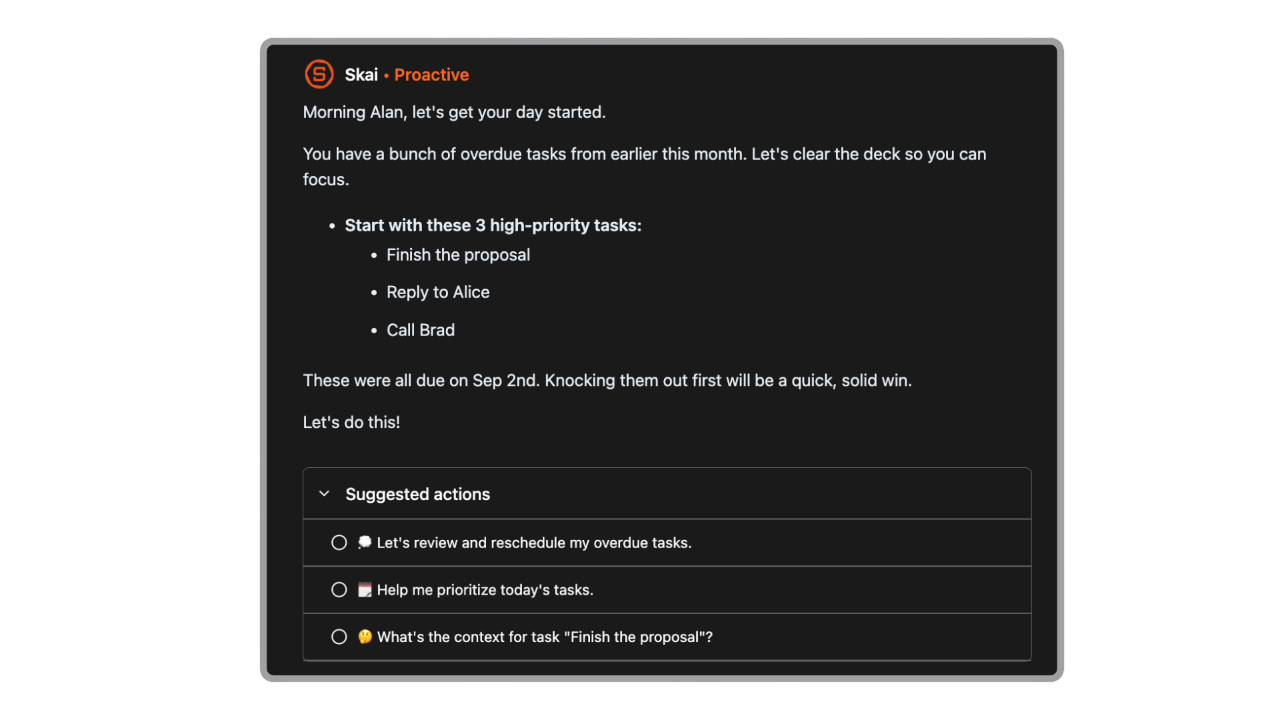
Saner automatically scans everything you’ve synced, including:
Emails
Tasks
Notes
Calendar events
Based on this context, it:
Lays out your day in plain language
Highlights urgent and high-priority tasks
Suggests a few small, actionable “quick wins” to help you build momentum
Purpose: Help you decide what to focus on next, without manually reviewing multiple tools.
2. Quick Access Lists
This is your personal capture and reference space for the day.
You can use it to jot down:
Tasks
Thoughts
Meeting notes
Ideas
All items appear in a timeline format, making it easy to see:
What’s coming up
What you’ve already completed
To help you resume work quickly, Quick Access Lists also include:
Recently Updated Notes – notes you’ve edited most recently
Recently Visited Notes – notes you’ve opened before
Purpose: Reduce friction when capturing information and returning to work-in-progress.
Top-Right Controls
In the top-right corner of the Homepage, you’ll find three key buttons:

AI Side Panel
Opens a chat interface where you can talk to Saner directly.
Use this to ask questions, get help, or clarify what to work on next.
Calendar View
Shows all tasks and events that have a specific scheduled time.
This view helps you understand your time-bound commitments at a glance.
Focus Box
A dedicated space for tasks you want to concentrate on.
You can:
Enable a floating Focus Box that follows you across tabs
Switch to full-screen mode when you’re ready for deep, uninterrupted work
Purpose: Help you stay locked in on a small set of tasks without distraction.
Summary
The Saner.AI Homepage brings together your priorities, context, and focus tools in one place—so you can start your day with clarity and keep moving without constant context switching.
Was this helpful?
Still need help? Share an idea