Auto tag, organize, and summarize each note
This explains how to use AI-powered features like Auto Tag, Summarize, and Note Location to organize your notes with minimal effort.
Written By Saner.AI
Last updated 10 months ago
Each note in Saner.ai includes a Note Options menu that helps you quickly organize and understand your content.
Where to find it
Hover over the note title
Click the arrow icon on the far right
The dropdown menu will appear directly below the title
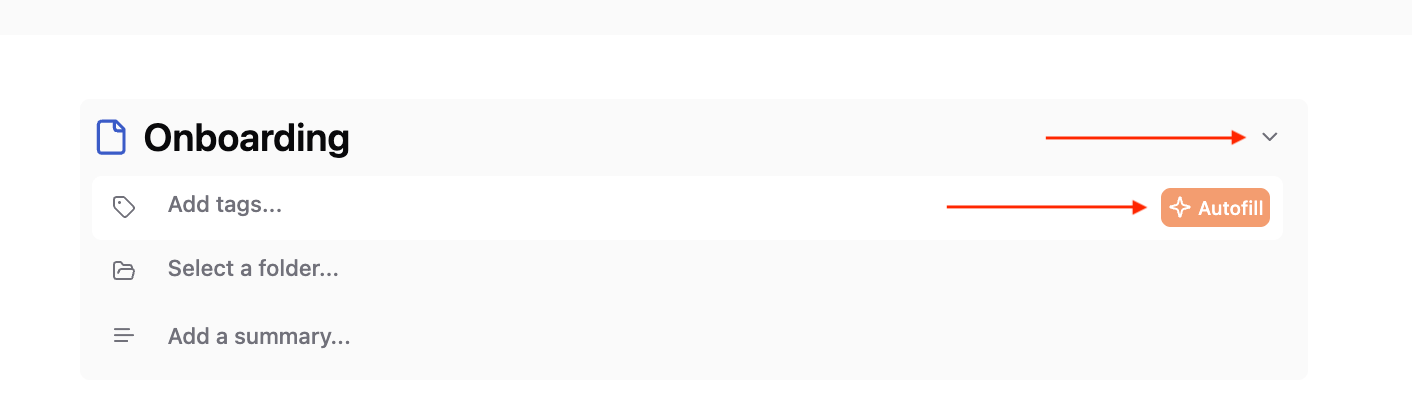
Inside this menu, you’ll find three options:
Tags
Note Location
Summarize
Each option can be used manually or with AI assistance.
Tags
Tags help you label and group related notes so they’re easier to find later.
How it works
Click Add tag
Select Autofill to let Saner.ai analyze the note and suggest relevant tags
Review the suggestions and keep, edit, or remove any tag
You can always add or change tags manually. Using clear, consistent tags improves search and helps Saner.ai understand how your notes are connected.
Note Location
Note Location controls where a note lives in your workspace (for example, which folder or section).
How it works
Click the Note Location field
Select Autofill to get a suggested location based on the note’s content
Or manually choose a folder if you prefer
Keeping notes in the right location makes them easier to browse and improves search accuracy over time.
Summarize
Summarize creates a short overview of a long or detailed note.
How it works
Click Add a summary
Select Autofill
Saner.ai generates a concise summary highlighting the key ideas
This is useful when you want to quickly remember what a note is about without rereading everything.
Video walkthrough
If you prefer a visual guide, this tutorial walks through auto-tagging, organizing notes, and using summaries in Saner.ai: 👉 https://www.youtube.com/watch?v=-YAs9H49D-4
Was this helpful?
Still need help? Share an idea